Understand Spanning Tree PortFast and BPDU Guard Features
Available Languages
Contents
Introduction
This document describes the PortFast and Bridge Protocol Data Unit (BPDU) guard enhancement feature of the Spanning Tree Protocol (STP).
Prerequisites
Requirements
There are no specific requirements for this document.
Components Used
These software versions introduced the STP PortFast BPDU guard:
-
Cisco IOS® Software Release 12.0(7)XE for the Catalyst 6500/6000 Platforms
-
Cisco IOS Software Release 12.1(8a)EW for the Catalyst 4500/4000 Supervisor Engine III
-
Cisco IOS Software Release 12.1(12c)EW for the Catalyst 4500/4000 Supervisor Engine IV
-
Cisco IOS Software Release 12.0(5)WC5 for the Catalyst 2900XL and 3500XL Series
-
Cisco IOS Software Release 12.1(11)AX for the Catalyst 3750 Series Switches
-
Cisco IOS Software Release 12.1(14)AX for the Catalyst 3750 Metro Switches
-
Cisco IOS Software Release 12.1(19)EA1 for the Catalyst 3560 Series Switches
-
Cisco IOS Software Release 12.1(4)EA1 for the Catalyst 3550 Series Switches
-
Cisco IOS Software Release 12.1(11)AX for the Catalyst 2970 Series Switches
-
Cisco IOS Software Release 12.1(12c)EA1 for the Catalyst 2955 Series Switches
-
Cisco IOS Software Release 12.1(6)EA2 for the Catalyst 2950 Series Switches
-
Cisco IOS Software Release 12.1(11)EA1 for the Catalyst 2950 Long-Reach Ethernet (LRE) Switches
-
Cisco IOS Software Release 12.1(13)AY for the Catalyst 2940 Series Switches
The information in this document was created from the devices in a specific lab environment. All of the devices used in this document started with a cleared (default) configuration. If your network is live, ensure that you understand the potential impact of any command.
Conventions
Refer toCisco Technical Tips Conventionsfor more information on document conventions.
Background Information
In a properly designed switched network, Spanning Tree Protocol (STP) prevents Layer 2 loops by placing redundant paths into a blocking state. Every port that comes up normally walks through the STP states (listening, learning, and finally forwarding) before it passes user traffic. That convergence delay, roughly 30 seconds with traditional 802.1D, is appropriate for switch-to-switch links but unnecessary for ports connected to end hosts such as PCs, servers, or printers, which cannot create a switching loop on their own.
The challenge is that a port connecting to an end host must not be receiving STP Bridge Protocol Data Units (BPDUs) at all. If BPDUs arrive on such a port, it usually signals one of two problems: someone has connected an unauthorized switch, or a device is running software that emulates a bridge. Either case can destabilize the topology, particularly if the rogue device advertises a superior bridge ID and forces a root bridge election it must never participate in.
A real-world example illustrates the risk. A user PC running a Linux-based bridging application was connected to an access port. Because the application sent BPDUs claiming a low bridge priority, the network elected the PC as the root bridge. This shifted the entire spanning-tree topology toward an underpowered host, congesting links and causing a network outage. BPDU Guard exists precisely to prevent this class of failure.
PortFast and BPDU Guard
PortFast immediately transitions an access or trunk port from the blocking state directly to the forwarding state, skipping the listening and learning phases. This eliminates the startup delay for ports connected to end devices, which is important for hosts that expect immediate network access (for example, workstations using DHCP at boot).
PortFast is intended only for ports connected to a single end station. Enabling it on a port that links to another switch reintroduces the very loop risk STP is designed to prevent, because the port begins forwarding before STP has a chance to detect a redundant path.
BPDU Guard complements the PortFast feature by enforcing the assumption that a PortFast enabled port must never see a BPDU. When BPDU Guard is enabled and the port receives a BPDU, the switch immediately shuts the port down by placing it in the errdisable state. This protects the topology in two ways:
- It prevents an unauthorized or misconfigured switch from injecting itself into the spanning tree.
- It blocks devices—like the Linux bridge in the earlier scenario—from hijacking the root role.
Because the port is administratively disabled rather than simply blocked, a network operator attention is drawn to the event, and the offending device is cleanly isolated until the issue is resolved.
A port placed in errdisable does not recover on its own unless errdisable recovery is configured. You can either re-enable the interface manually (shutdown followed by no shutdown) or configure automatic recovery for the BPDU Guard cause.
This message is an example:
2000 May 12 15:13:32 %SPANTREE-2-RX_PORTFAST:Received BPDU on PortFast enable port. Disabling 2/1
2000 May 12 15:13:32 %PAGP-5-PORTFROMSTP:Port 2/1 left bridge port 2/1
Consider the next example:
Example 1 - Normal STP Operation
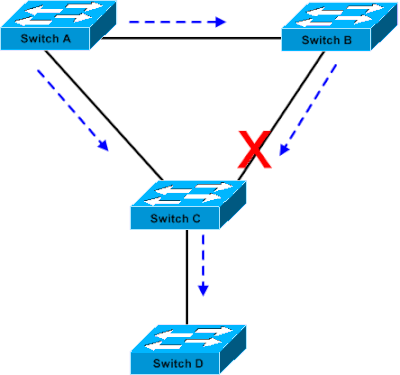 Bridge Connection
The topology consists of three switches forming the core and access layers, plus an end device:
- Switch Ahas a bridge priority of8192and is the root bridge for the VLAN.
- Switch Bhas a bridge priority of16384, making it the backup root bridge for the same VLAN.
- Switches A and Bare joined by aGigabit Ethernetlink, and together they make up the core of the network.
- Switch Cis an access switch. It hasPortFastconfigured on the port connecting toDevice D.
- Device Dis a PC and does not participate in STP.
With all other STP parameters left at their defaults, STP converges as expected. Switch A is elected root, and the redundant path is blocked to break the loop, specifically, the Switch C port facing Switch B is placed in the blocking state (shown by the red "X" on that link). The dashed arrows trace the normal flow of STP BPDUs through the topology. This can be seen as a stable network where PortFast gives Device D immediate connectivity, while STP quietly manages the redundant core links.
Example 2 - Rogue Bridge Causes an Outage
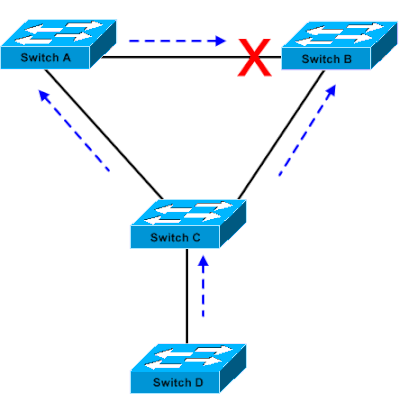 Linux-based Bridge Application is Launched on a PC
This example shows what happens when Device D stops behaving like a simple end host and starts participating in STP, exactly like the scenario BPDU Guard is designed to stop. A Linux-based bridge application is launched on the PC (Device D). The application advertises a bridge priority of 0 (or any value lower than the current root priority). Because STP always favors the lowest bridge ID, the Linux-based bridge wins the root election and takes over the root bridge role from Switch A.
This re-election reshapes the entire topology. The high-speed Gigabit Ethernet link between the two core switches (A and B) transitions to blocking (shown by the red "X" moving to the core link). As a result, all VLAN traffic that previously used the Gigabit core is forced onto a slower 100-Mbps path. When traffic demand exceeds what that link can carry, the switch begins dropping frames, and the outcome is a connectivity outage.
How does the BPDU Guard prevent the issue? Because Switch C has PortFast enabled on the port to Device D, that port must never receive a BPDU. The moment Device D sends an STP BPDU, the BPDU Guard shuts the port down by placing it in the errdisable state. Device D is isolated before it can ever influence the root election, and the core topology stays intact.
Configuration
The recommended approach is to enable PortFast and BPDU Guard together on the host facing access ports. You can enable or disable STP PortFast BPDU guard on a global or per-interface basis. By default, the STP BPDU guard is disabled.
Enable PortFast and BPDU Guard Per-interface
CatSwitch-IOS(config-if)#spanning-tree portfast
CatSwitch-IOS(config-if)#spanning-tree bpduguard enable
Enable BPDU Guard Globally
CatSwitch-IOS(config)#spanning-tree portfast bpduguard default
With the global command, every port configured with PortFast automatically inherits BPDU Guard, so you do not need to set it on each interface individually.
Configure Automatic Recovery errdisable State
When STP BPDU guard disables the port, the port remains in a disabled state unless the port is enabled manually. You can configure a port to re-enable itself automatically from the errdisable state. Issue these commands, which set the errdisable-timeout interval and enable the timeout feature:
CatSwitch-IOS(config)#errdisable recovery cause bpduguard
CatSwitch-IOS(config)#errdisable recovery interval 400
Verification
To verify whether the feature is enabled or disabled, run the next applicable command:
CatSwitch-IOS#show spanning-tree summary totals
Root bridge for: none.
PortFast BPDU Guard is enabled
UplinkFast is disabled
BackboneFast is disabled
Spanning tree default pathcost method used is short


Name                 Blocking Listening Learning Forwarding STP Active
-------------------- -------- --------- -------- ---------- ----------
  1 VLAN                 0        0         0        1          1

CatSwitch-IOS#
Related Information
Revision History
| Revision | Publish Date | Comments |
|---|---|---|
4.0 |
05-Jun-2026
|
Updated spelling, grammar, spacing, and introduction. |
3.0 |
12-May-2025
|
Updated formatting to comply with Cisco Guidelines. |
2.0 |
22-Mar-2024
|
Updated formatting. Corrected CCW Alerts. Recertification. |
1.0 |
29-Nov-2001
|
Initial Release |

 Feedback
Contact Cisco
- Open a Support Case

- (Requires a Cisco Service Contract)