Enable Specific License Reservation for CUCM Version 12.5
Available Languages
Introduction
This document describes the Specific License Reservation for Cisco Unified Communications Manager (CUCM) version 12.5.
Prerequisites
Requirements
Cisco recommends that you have knowledge of these topics:
- CUCM version 12.5
Components Used
The information in this document is based on Cisco Call Manager version 12.5
The information in this document was created from the devices in a specific lab environment. All of the devices used in this document started with a cleared (default) configuration. If your network is live, ensure that you understand the potential impact of any command.
Background Information
Specific License Reservation is a feature that is used in highly secure networks. It provides a method for you to deploy a software license on a device (Product Instance - Unified Communications Manager) without communicating usage information.
You can specify and reserve perpetual or term-based licenses against the Unified Communications Manager product. After the authorization code is exchanged, regular product synchronization is not required until there are changes in the reservation. Reserved licenses remain blocked in Cisco License Central unless released from the product with a return code.
This feature is available through CLI, there is no GUI option available as of now.
Product Instance Evaluation Mode
After installation, the Unified Communications Manager runs under the 90-day evaluation period. At the end of the evaluation period, the Unified Communications Manager does not allow the addition of new users or devices until registered with Cisco License Central or satellite.
Procedure
This is the procedure to enable Specific License Reservation Feature:
Step 1. The device is not connected to the internet and is in the unregistered state.
Step 2. Use the CLI to enable the feature and get a License Reservation request code.
       admin:license smart reservation enable

       License reservation mode is enabled successfully.


       admin:license smart reservation request

       P:UCM,S:cc920,U:e53fc968-0253-4d61-a355-ba908a6cc920   -->   UDI
Step 3. Log in to Cisco License Central and enter the reservation code.


Step 4. Select the licenses that have to be purchased, and you want to reserve for this device.
Step 5. An authorization code is generated which contains a list of entitlement tags and counts that are allowed to be used on the product instance.
Step 6. Take this authorization code back to the product instance and use the CLI to install it.
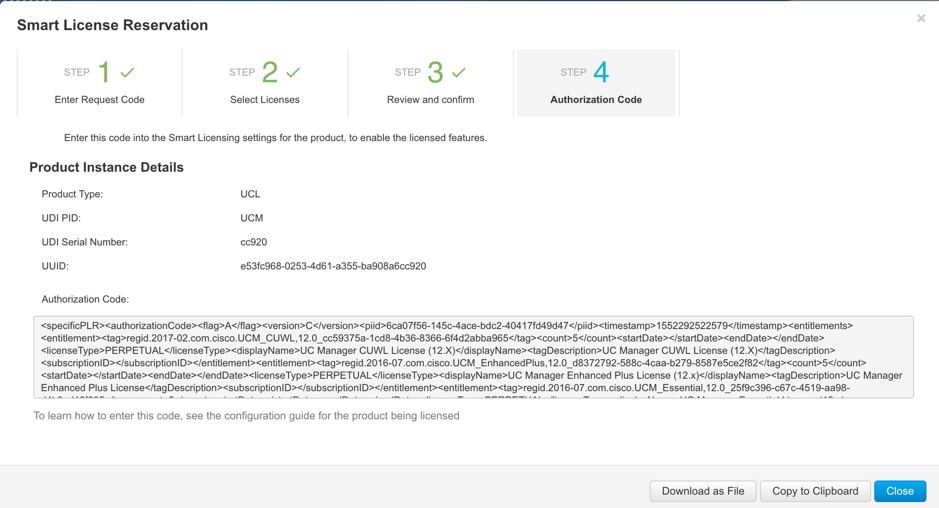
admin:license smart reservation install
license smart reservation install "<specificPLR><authorizationCode><flag>A</flag><version>C</version><piid>6ca07f56-145c-4ace-bdc2-40417fd49d47</piid><timestamp>1552292522579</timestamp><entitlements><entitlement><tag>regid.2017-02.com.cisco.UCM_CUWL,12.0_cc59375a-1cd8-4b36-8366-6f4d2abba965</tag><count>5</count><startDate></startDate><endDate></endDate><licenseType>PERPETUAL</licenseType><displayName>UC Manager CUWL License (12.X)</displayName><tagDescription>UC Manager CUWL License (12.X)</tagDescription><subscriptionID></subscriptionID></entitlement><entitlement><tag>regid.2016-07.com.cisco.UCM_EnhancedPlus,12.0_d8372792-588c-4caa-b279-8587e5ce2f82</tag><count>5</count><startDate></startDate><endDate></endDate><licenseType>PERPETUAL</licenseType><displayName>UC Manager Enhanced Plus License (12.x)</displayName><tagDescription>UC Manager Enhanced Plus License</tagDescription><subscriptionID></subscriptionID></entitlement><entitlement><tag>regid.2016-07.com.cisco.UCM_Essential,12.0_25f9c396-c67c-4519-aa98-d4b3ad18f805</tag><count>5</count><startDate></startDate><endDate></endDate><licenseType>PERPETUAL</licenseType><displayName>UC Manager Essential License (12.x)</displayName><tagDescription>UC Manager Essential License</tagDescription><subscriptionID></subscriptionID></entitlement><entitlement><tag>regid.2016-07.com.cisco.UCM_Basic,12.0_ef827a2f-f4ae-4ebb-887f-052737063d3a</tag><count>5</count><startDate></startDate><endDate></endDate><licenseType>PERPETUAL</licenseType><displayName>UC Manager Basic License (12.x)</displayName><tagDescription>UC Manager Basic License</tagDescription><subscriptionID></subscriptionID></entitlement><entitlement><tag>regid.2016-07.com.cisco.UCM_Enhanced,12.0_66d0d1cf-4863-4761-91d0-d01d3eb1949a</tag><count>5</count><startDate></startDate><endDate></endDate><licenseType>PERPETUAL</licenseType><displayName>UC Manager Enhanced License (12.x)</displayName><tagDescription>UC Manager Enhanced License</tagDescription><subscriptionID></subscriptionID></entitlement></entitlements></authorizationCode><signature>MEYCIQChzdzDxXMoQZ7WofeNaOP2DYaEP3bxaxea1o5U027VYgIhAKDBRmIZhoQvmphYR1DJAmxaOAjLIcGWcBPF5ERCIxYc</signature><udi>P:UCM,
S:cc920,U:e53fc968-0253-4d61-a355-ba908a6cc920</udi></specificPLR>"
Authorization code installed successfully.
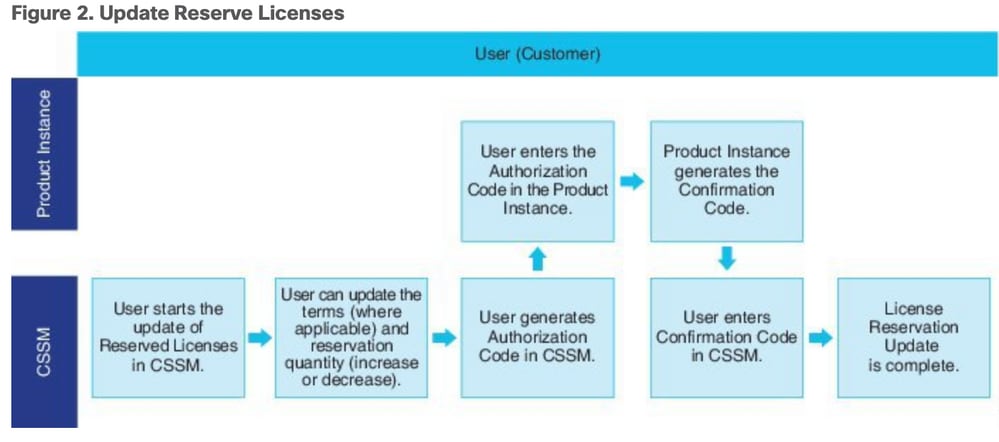
Step 7. If you need to get more licenses for your product instance, you can do it from Cisco License Central portal to update the reserved license and get a new authorization code.
Copy the authorization code to the production instance and execute the license smart reservation install <authorization-code> command to install.
Confirmation code is generated on the product after the authorization code is successfully installed.
Copy the confirmation code to Cisco License Central and enter to complete the reservation update.

license smart reservation install "<specificPLR><authorizationCode><flag>A</flag><version>C</version><piid>6ca07f56-145c-4ace-bdc2-40417fd49d47</piid><timestamp>1552292522579</timestamp><entitlements><entitlement><tag>regid.2017-02.com.cisco.UCM_CUWL,12.0_cc59375a-1cd8-4b36-8366-6f4d2abba965</tag><count>5</count><startDate></startDate><endDate></endDate><licenseType>PERPETUAL</licenseType><displayName>UC Manager CUWL License (12.X)</displayName><tagDescription>UC Manager CUWL License (12.X)</tagDescription><subscriptionID></subscriptionID></entitlement><entitlement><tag>regid.2016-07.com.cisco.UCM_EnhancedPlus,12.0_d8372792-588c-4caa-b279-8587e5ce2f82</tag><count>5</count><startDate></startDate><endDate></endDate><licenseType>PERPETUAL</licenseType><displayName>UC Manager Enhanced Plus License (12.x)</displayName><tagDescription>UC Manager Enhanced Plus License</tagDescription><subscriptionID></subscriptionID></entitlement><entitlement><tag>regid.2016-07.com.cisco.UCM_Essential,12.0_25f9c396-c67c-4519-aa98-d4b3ad18f805</tag><count>5</count><startDate></startDate><endDate></endDate><licenseType>PERPETUAL</licenseType><displayName>UC Manager Essential License (12.x)</displayName><tagDescription>UC Manager Essential License</tagDescription><subscriptionID></subscriptionID></entitlement><entitlement><tag>regid.2016-07.com.cisco.UCM_Basic,12.0_ef827a2f-f4ae-4ebb-887f-052737063d3a</tag><count>5</count><startDate></startDate><endDate></endDate><licenseType>PERPETUAL</licenseType><displayName>UC Manager Basic License (12.x)</displayName><tagDescription>UC Manager Basic License</tagDescription><subscriptionID></subscriptionID></entitlement><entitlement><tag>regid.2016-07.com.cisco.UCM_Enhanced,12.0_66d0d1cf-4863-4761-91d0-d01d3eb1949a</tag><count>5</count><startDate></startDate><endDate></endDate><licenseType>PERPETUAL</licenseType><displayName>UC Manager Enhanced License (12.x)</displayName><tagDescription>UC Manager Enhanced License</tagDescription><subscriptionID></subscriptionID></entitlement></entitlements></authorizationCode><signature>MEYCIQChzdzDxXMoQZ7WofeNaOP2DYaEP3bxaxea1o5U027VYgIhAKDBRmIZhoQvmphYR1DJAmxaOAjLIcGWcBPF5ERCIxYc</signature><udi>P:UCM,S:cc920,U:e53fc968-0253-4d61-a355-ba908a6cc920</udi></specificPLR>"


Verify
In this image, you get to see CUCM GUI with Smart License Reservation enabled.

Remove Licenses or Product Instance
When licenses are reserved on a Product Instance (Unified Communications Manager), there are two ways to remove the product from the smart account and release all the licenses that are reserved for that Product Instance (Unified Communications Manager).
Product Instance is operational (graceful removal):You can return the Specific License Reservation authorization by creating a Reservation Return code on the Product Instance (which removes the Authorization Code) and then enter the Reservation Return code into Cisco License Central.
Product Instance is not operational (failure/RMA or due to the VM/container destroyed):You must contact TAC, who can remove the Product Instance from their smart account.

admin:license smart reservation return
Use this procedure to generate a return code that must be entered into Cisco License Central to return the licenses to the virtual account pool, and remove the product instance from Cisco License Central.
- From Cisco Unified CM Admin Console, execute the license smart reservation return command.
- Copy the reservation return code to Cisco License Central and remove the product instance.


license smart reservation return-authorization <authorization-code>
Use this procedure to generate a return code for the authorization code not installed yet. The return code must be entered into Cisco License Central to return the licenses to the virtual account pool and remove the product instance from Cisco License Central.
- From Cisco Unified CM Admin Console, execute the license smart reservation return-authorization <authorization-code> command.
- Copy the reservation return code to Cisco License Central and remove the product instance.
Troubleshoot
In case of any issue, you need to collect these logs :
- Smart agent logs are a part of slm.log (activelog/cm/trace/slm/log4j/slm.log)
- Call home logs are written into:
- activelog/cm/trace/slm/log4j/gch.log
- activelog/cm/trace/slm/log4j/tp.log
Related Information
- System Configuration Guide for Cisco Unified Communications Manager, Release 12.5(1)SU2
- Technical Support & Documentation - Cisco Systems
Revision History
| Revision | Publish Date | Comments |
|---|---|---|
4.0 |
03-Jun-2026
|
Replace references to "Cisco Smart Software Manager (SSM)" with "Cisco License Central." |
3.0 |
05-Sep-2024
|
Dismissed False Positive CCW Alert
Reviewed for formatting and grammar |
2.0 |
17-Feb-2023
|
Added Alt Text.
Updated Title, Introduction, SEO, Style Requirements, Gerunds and Formatting. |
1.0 |
03-May-2019
|
Initial Release |

 Feedback
Contact Cisco
- Open a Support Case

- (Requires a Cisco Service Contract)