




Contents
- Configuring IP Services
- Finding Feature Information
- Information About IP Services
- IP Source Routing
- ICMP Overview
- ICMP Unreachable Error Messages
- ICMP Mask Reply Messages
- ICMP Redirect Messages
- Denial of Service Attack
- Path MTU Discovery
- IP MAC and Precedence Accounting
- Show and Clear Commands for IOS Sockets
- How to Configure IP Services
- Protecting Your Network from DOS Attacks
- Configuring ICMP Unreachable Rate Limiting User Feedback
- Setting the MTU Packet Size
- Configuring IP Accounting
- Monitoring and Maintaining the IP Network
- Configuration Examples for IP Services
- Example Protecting Your Network from DOS Attacks
- Example Configuring ICMP Unreachable Destination Counters
- Example Setting the MTU Packet Size
- Example Configuring IP Accounting
- Additional References
- Feature Information for IP Services
Configuring IP Services
This module describes how to configure optional IP services. For a complete description of the IP services commands in this chapter, refer to the Cisco IOS IP Application Services Command Reference. To locate documentation of other commands that appear in this module, use the command reference master index, or search online.
Finding Feature Information
Your software release may not support all the features documented in this module. For the latest feature information and caveats, see the release notes for your platform and software release. To find information about the features documented in this module, and to see a list of the releases in which each feature is supported, see the Feature Information Table at the end of this document.
Use Cisco Feature Navigator to find information about platform support and Cisco software image support. To access Cisco Feature Navigator, go to www.cisco.com/go/cfn. An account on Cisco.com is not required.
Information About IP Services
- IP Source Routing
- ICMP Overview
- ICMP Unreachable Error Messages
- ICMP Mask Reply Messages
- ICMP Redirect Messages
- Denial of Service Attack
- Path MTU Discovery
- IP MAC and Precedence Accounting
- Show and Clear Commands for IOS Sockets
IP Source Routing
The Cisco IOS software examines IP header options on every packet. It supports the IP header options Strict Source Route, Loose Source Route, Record Route, and Time Stamp, which are defined in RFC 791. If the software finds a packet with one of these options enabled, it performs the appropriate action. If it finds a packet with an invalid option, it sends an Internet Control Message Protocol (ICMP) parameter problem message to the source of the packet and discards the packet.
IP provides a provision known as source routing that allows the source IP host to specify a route through the IP network. Source routing is specified as an option in the IP header. If source routing is specified, the software forwards the packet according to the specified source route. IP source routing is employed when you want to force a packet to take a certain route through the network. The default is to perform source routing. IP source routing is rarely used for legitimate purposes in networks. Some older IP implementations do not process source-routed packets properly, and it may be possible to crash devices running these implementations by sending them datagrams with source routing options. Disable IP source routing whenever possible. Disabling IP source routing will cause a Cisco router to never forward an IP packet that carries a source routing option.
ICMP Overview
Originally created for the TCP/IP suite in RFC 792, the Internet Control Message Protocol (ICMP) was designed to report a small set of error conditions. ICMP also can report a wide variety of error conditions and provide feedback and testing capabilities. Each message uses a common format and is sent and received by using the same protocol rules.
ICMP enables IP to perform addressing, datagram packaging, and routing by allowing encapsulated messages to be sent and received between IP devices. These messages are encapsulated in IP datagrams just like any other IP message. When the message is generated, the original IP header is encapsulated in the ICMP message and these two pieces are encapsulated within a new IP header to be returned as an error report to the sending device.
ICMP messages are sent in several situations: when a datagram cannot reach its destination, when the gateway does not have the buffering capacity to forward a datagram, and when the gateway can direct the host to send traffic on a shorter route. To avoid the infinite regress of messages about messages, no ICMP messages are sent about ICMP messages.
ICMP does not make IP reliable or ensure the delivery of datagrams or the return of a control message. Some datagrams may be dropped without any report of their loss. The higher-level protocols that use IP must implement their own reliability procedures if reliable communication is required.
ICMP Unreachable Error Messages
Type 3 error messages are sent when a message cannot be delivered completely to the application at a destination host. Six codes contained in the ICMP header describe the unreachable condition as follows:
- 0--Network unreachable
- 1--Host unreachable
- 2--Protocol unreachable
- 3--Port unreachable
- 4--Fragmentation needed and the âdonât fragmentâ (DF) bit is set
- 5--Source route failed
Cisco IOS software can suppress the generation of ICMP unreachable destination error messages, which is called rate-limiting. The default is no unreachable messages more often than once every half second. Separate intervals can be configured for code 4 and all other unreachable destination error messages. However, there is no method of displaying how many ICMP messages have not been sent.
The ICMP Unreachable Destination Counters feature provides a method to count and display the unsent Type 3 messages. This feature also provides console logging with error messages when there are periods of excessive rate limiting that would indicate a Denial of Service (DoS) attack against the router.
If the Cisco IOS software receives a nonbroadcast packet destined for itself that uses an unknown protocol, it sends an ICMP protocol unreachable message back to the source. Similarly, if the software receives a packet that it is unable to deliver to the final destination because it knows of no route to the destination address, it sends an ICMP host unreachable message to the source. This functionality is enabled by default.
Disable Internet Message Control Protocol (ICMP) host unreachable messages whenever possible. ICMP supports IP traffic by relaying information about paths, routes, and network conditions. These messages can be used by an attacker to gain network mapping information.
Because the null interface is a packet sink, packets forwarded there will always be discarded and, unless disabled, will generate host unreachable messages. In that case, if the null interface is being used to block a Denial-of-Service attack, these messages flood the local network with these messages. Disabling these messages prevents this situation. In addition, because all blocked packets are forwarded to the null interface, an attacker receiving host unreachable messages could use those messages to determine Access Control List (ACL) configuration. If the ânull 0â interface is configured on your router, disable ICMP host unreachable messages for discarded packets or packets routed to the null interface.
ICMP Mask Reply Messages
Occasionally, network devices must know the subnet mask for a particular subnetwork in the internetwork. To obtain this information, such devices can send ICMP mask request messages. ICMP mask reply messages are sent in reply from devices that have the requested information. The Cisco IOS software can respond to ICMP mask request messages if this function is enabled.
These messages can be used by an attacker to gain network mapping information.
ICMP Redirect Messages
Routes are sometimes less than optimal. For example, it is possible for the router to be forced to resend a packet through the same interface on which it was received. If the router resends a packet through the same interface on which it was received, the Cisco IOS software sends an ICMP redirect message to the originator of the packet telling the originator that the router is on a subnet directly connected to the receiving device, and that it must forward the packet to another system on the same subnet. The software sends an ICMP redirect message to the originator of the packet because the originating host presumably could have sent that packet to the next hop without involving this device at all. The redirect message instructs the sender to remove the receiving device from the route and substitute a specified device representing a more direct path. This functionality is enabled by default.
In a properly functioning IP network, a router will send redirects only to hosts on its own local subnets, no end node will ever send a redirect, and no redirect will ever be traversed more than one network hop. However, an attacker may violate these rules; some attacks are based on this. Disabling ICMP redirects will cause no operational impact to the network, and it eliminates this possible method of attack.
Denial of Service Attack
Denial of service has become a growing concern, especially when considering the associated costs of such an attack. DoS attacks can decrease the performance of networked devices, disconnect the devices from the network, and cause system crashes. When network services are unavailable, enterprises and service providers suffer the loss of productivity and sales.
The objective of a DoS attack is to deprive a user or organization access to services or resources. If a Website is compromised by a DoS attack, millions of users could be denied access to the site. DoS attacks do not typically result in intrusion or the illegal theft of information. Instead of providing access to unauthorized users, DoS attacks can cause much aggravation and cost to the target customer by preventing authorized access. Distributed DoS (DDoS) attacks amplify DoS attacks in that a multitude of compromised systems coordinate to flood targets with attack packets, thereby causing denial of service for users of the targeted systems.
A DoS attack occurs when a stream of ICMP echo requests (pings) are broadcast to a destination subnet. The source addresses of these requests are falsified to be the source address of the target. For each request sent by the attacker, many hosts on the subnet will respond flooding the target and wasting bandwidth. The most common DoS attack is called a âsmurfâ attack, named after an executable program and is in the category of network-level attacks against hosts. DoS attacks can be easily detected when error-message logging of the ICMP Unreachable Destination Counters feature is enabled.
Path MTU Discovery
The Cisco IOS software supports the IP Path MTU Discovery mechanism, as defined in RFC 1191. IP Path MTU Discovery allows a host to dynamically discover and cope with differences in the maximum allowable maximum transmission unit (MTU) size of the various links along the path. Sometimes a router is unable to forward a datagram because it requires fragmentation (the packet is larger than the MTU you set for the interface with the ip mtu interface configuration command), but the âdonât fragmentâ (DF) bit is set. TheCisco IOS software sends a message to the sending host, alerting it to the problem. The host will need to fragment packets for the destination so that they fit the smallest packet size of all the links along the path. This technique is shown in the figure below.
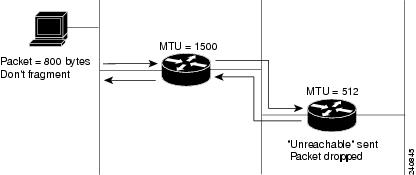
IP Path MTU Discovery is useful when a link in a network goes down, forcing the use of another, different MTU-sized link (and different routers). As shown in the figure above, suppose a router is sending IP packets over a network where the MTU in the first router is set to 1500 bytes, but the second router is set to 512 bytes. If the âdonât fragmentâ bit of the datagram is set, the datagram would be dropped because the 512-byte router is unable to forward it. All packets larger than 512 bytes are dropped in this case. The second router returns an ICMP destination unreachable message to the source of the datagram with its Code field indicating âFragmentation needed and DF set.â To support IP Path MTU Discovery, it would also include the MTU of the next hop network link in the low-order bits of an unused header field.
IP Path MTU Discovery is also useful when a connection is being established and the sender has no information at all about the intervening links. It is always advisable to use the largest MTU that the links will bear; the larger the MTU, the fewer packets the host must send.

If a router that is configured with a small MTU on an outbound interface receives packets from a host that is configured with a large MTU (for example, receiving packets from a Token Ring interface and forwarding them to an outbound Ethernet interface), the router fragments received packets that are larger than the MTU of the outbound interface. Fragmenting packets slows the performance of the router. To keep routers in your network from fragmenting received packets, run IP Path MTU Discovery on all hosts and routers in your network, and always configure the largest possible MTU for each router interface type.
IP MAC and Precedence Accounting
Cisco IP accounting support provides basic IP accounting functions. By enabling IP accounting, users can see the number of bytes and packets switched through the Cisco IOS software on a source and destination IP address basis. Only transit IP traffic is measured and only on an outbound basis; traffic generated by the software or terminating in the software is not included in the accounting statistics. To maintain accurate accounting totals, the software maintains two accounting databases: an active and a checkpointed database.
Cisco IP accounting support also provides information identifying IP traffic that fails IP access lists. Identifying IP source addresses that violate IP access lists alerts you to possible attempts to breach security. The data also indicates that you should verify IP access list configurations. To make this functionality available to users, you must enable IP accounting of access list violations using the ip accounting access-violations interface configuration command. Users can then display the number of bytes and packets from a single source that attempted to breach security against the access list for the source destination pair. By default, IP accounting displays the number of packets that have passed access lists and were routed.
The MAC address accounting functionality provides accounting information for IP traffic based on the source and destination MAC addresses on LAN interfaces. MAC accounting calculates the total packet and byte counts for a LAN interface that receives or sends IP packets to or from a unique MAC address. It also records a timestamp for the last packet received or sent. For example, with IP MAC accounting, you can determine how much traffic is being sent to and/or received from various peers at Network Access Profiles (NAPS)/peering points. IP MAC accounting is supported on Ethernet, Fast Ethernet, and FDDI interfaces and supports Cisco Express Forwarding (CEF), distributed CEF (dCEF), flow, and optimum switching.
The Precedence Accounting feature provides accounting information for IP traffic based on the precedence on any interface. This feature calculates the total packet and byte counts for an interface that receives or sends IP packets and sorts the results based on IP precedence. This feature is supported on all interfaces and subinterfaces and supports CEF, dCEF, flow, and optimum switching.
Show and Clear Commands for IOS Sockets
The Show and Clear Commands for IOS Sockets feature introduces the show udp, show sockets, and clear socketscommands. These new commands are useful for monitoring and managing the Cisco IOS Socket library.
In Cisco IOS software, sockets are a per process entity. This means that the maximum number of sockets is per process and all sockets are managed on a per process basis. For example, each Cisco IOS process could have a socket with file descriptor number 1. This is unlike UNIX or other operating systems that have per system file descriptor allocations.
The showand clear commands operate on a per process basis to be consistent with the current functionality. Thus, any action taken by the commands will be applicable only to a particular process at a time as selected by the process ID entered on the CLI.
Many applications have a need for show and clearcommands, which primarily aid in debugging. The following scenarios provide examples of when these commands might be useful:
- The application H.323 is using sockets for voice calls. According to the current number of calls, there is still space for more sockets. However, no more sockets can be opened. You can now use the the show sockets command to find out if the socket space is indeed exhausted or if there are unused sockets available.
- An application is waiting for a particular socket event to happen. A UDP segment was seen, but the application never became active. You can use the show udp command to display the list of events being monitored to determine if a UDP socket event is being monitored or if the socket library failed to activate the application.
- An application wants to forcibly close all the sockets for a particular process. You can use the clear sockets command to close both the sockets and the underlying TCP or UDP connection or Stream Control Transmission Protocol (SCTP) association.
How to Configure IP Services
- Protecting Your Network from DOS Attacks
- Configuring ICMP Unreachable Rate Limiting User Feedback
- Setting the MTU Packet Size
- Configuring IP Accounting
- Monitoring and Maintaining the IP Network
Protecting Your Network from DOS Attacks
ICMP supports IP traffic by relaying information about paths, routes, and network conditions. ICMP messages can be used by an attacker to gain network mapping information. IP source routing allows the source IP host to specify a route through the IP network and is rarely used for legitimate purposes in networks. Some older IP implementations do not process source-routed packets properly, and it may be possible to crash devices running these implementations by sending them datagrams with source routing options.
Whenever possible, ICMP messages and IP source routing should be disabled.
DETAILED STEPS
Configuring ICMP Unreachable Rate Limiting User Feedback
Perform this task to clear all of the unreachable destination packet statistics and to specify an interval number for unreachable destination messages. This task also configures a packet counter (threshold) and interval to trigger a logging message to a console. This task is beneficial to begin a new log after the thresholds have been set.
DETAILED STEPS
| Command or Action | Purpose | |||
|---|---|---|---|---|
| Step 1 |
enable
Example: Router> enable |
Enables privileged EXEC mode. | ||
| Step 2 |
clear
ip
icmp
rate-limit
[interface-type
interface-number]
Example: Router# clear ip icmp rate-limit ethernet 2/3 |
Clears all current ICMP unreachable statistics for all configured interfaces. The optional interface-type and interface-number arguments clear the statistics for only one interface. | ||
| Step 3 |
configure
terminal
Example: Router# configure terminal |
Enters global configuration mode. | ||
| Step 4 |
ip
icmp
rate-limit
unreachable
[df] [ms] [log [packets] [interval-ms]]
Example: Router(config)# ip icmp rate-limit unreachable df log 1100 12000 |
Specifies the rate limitation of ICMP unreachable destination messages and the error message log threshold for generating a message. The default is no unreachable messages are sent more often than once every half second. The arguments and keywords are as follows:
| ||
| Step 5 |
exit
Example: Router# exit |
Exits to privileged EXEC mode. | ||
| Step 6 |
show
ip
icmp
rate-limit
[interface-type
interface-number]
Example: Router# show ip icmp rate-limit ethernet 2/3 |
(Optional) Displays all current ICMP unreachable statistics for all configured interfaces. The optional interface-type and interface-number arguments display the statistics for only one interface. |
Example
The following output using theshow ip icmp rate-limit command displays the unreachable destinations by interface:
Router# show ip icmp rate-limit
                           DF bit unreachables       All other unreachables
Interval (millisecond)     500                       500
Interface                  # DF bit unreachables     # All other unreachables
---------                  ---------------------     ------------------------
Ethernet0/0                0                         0
Ethernet0/2                0                         0
Serial3/0/3                0                         19
The greatest number of unreachables is on serial interface 3/0/3.
Setting the MTU Packet Size
All interfaces have a default MTU packet size. You can adjust the IP MTU size so that the Cisco IOS software will fragment any IP packet that exceeds the MTU set for an interface.
Changing the MTU value (with the mtu interface configuration command) can affect the IP MTU value. If the current IP MTU value is the same as the MTU value and you change the MTU value, the IP MTU value will be modified automatically to match the new MTU. However, the reverse is not true; changing the IP MTU value has no effect on the value for the mtu interface configuration command.
All devices on a physical medium must have the same protocol MTU in order to operate.
Perform this task to set the MTU packet size for a specified interface.
DETAILED STEPS
| Command or Action | Purpose | |
|---|---|---|
| Step 1 |
enable
Example: Router> enable |
Enables privileged EXEC mode. |
| Step 2 |
configure
terminal
Example: Router# configure terminal |
Enters global configuration mode. |
| Step 3 |
interface
type
/
number
Example: Router(config)# interface GigabitEthernet0/0/0 |
Specifies the interface to configure and enters interface configuration mode. |
| Step 4 |
ip
mtu
bytes
Example: Router(config-if)# ip mtu 300 |
Sets the IP MTU packet size for an interface. |
| Step 5 |
exit
Example: Router(config-if)# exit |
Exits to privileged EXEC mode. |
Configuring IP Accounting
DETAILED STEPS
| Command or Action | Purpose | |
|---|---|---|
| Step 1 |
enable
Example: Router> enable |
Enables privileged EXEC mode. |
| Step 2 |
configure
terminal
Example: Router# configure terminal |
Enters global configuration mode. |
| Step 3 |
ip
accounting-threshold
threshold
Example: Router(config)# ip accounting-threshold 500 |
(Optional) Sets the maximum number of accounting entries to be created. |
| Step 4 |
ip
accounting-list
ip-address
wildcard
Example: Router(config)# ip accounting-list 192.31.0.0 0.0.255.255 |
(Optional) Filters accounting information for hosts. |
| Step 5 |
ip
accounting-transits
count
Example: Router(config)# ip accounting-transits 100 |
(Optional) Controls the number of transit records that will be stored in the IP accounting database. |
| Step 6 |
interface
type
/
number
Example: Router(config)# interface GigabitEthernet1/0/0 |
Specifies the interface and enters interface configuration mode. |
| Step 7 |
ip
accounting
[access-violations] [output-packets]
Example: Router(config-if)# ip accounting access-violations |
Enables basic IP accounting. |
| Step 8 |
ip
accounting
mac-address
{input |
output}
Example: Router(config-if)# ip accounting mac-address output |
(Optional) Configures IP accounting based on the MAC address of received (input) or transmitted (output) packets. |
Monitoring and Maintaining the IP Network
DETAILED STEPS
| Step 1 |
clear
ip
traffic
To clear all IP traffic statistical counters on all interfaces, use the following command: Example: Router# clear ip traffic |
| Step 2 |
clear
ip
accounting
checkpoint
You can remove all contents of a particular cache, table, or database. Clearing a cache, table, or database can become necessary when the contents of the particular structure have become or are suspected to be invalid. To clear the active IP accounting database when IP accounting is enabled, use the following command: Example: Router# clear ip accounting To clear the checkpointed IP accounting database when IP accounting is enabled, use the following command: Example: Router# clear ip accounting checkpoint |
| Step 3 |
clear
sockets
process-id
To close all IP sockets and clear the underlying transport connections and data structures for the specified process, use the following command: Example: Router# clear sockets 35 All sockets (TCP, UDP and SCTP) for this process will be cleared. Do you want to proceed? [yes/no]: y Cleared sockets for PID 35 |
| Step 4 |
show
ip
accounting
checkpoint |output-packets |access-violations
To display access list violations, use the show ip accounting command. To use this command, you must first enable IP accounting on a per-interface basis. Use the checkpoint keyword to display the checkpointed database. Use the output-packets keyword to indicate that information pertaining to packets that passed access control and were routed should be displayed. Use the access-violations keyword to display the number of the access list failed by the last packet for the source and destination pair. The number of packets reveals how aggressive the attack is upon a specific destination. If you do not specify the access-violations keyword, the command defaults to displaying the number of packets that have passed access lists and were routed. If neither the output-packets nor access-violations keyword is specified, output-packets is the default. The following is sample output from the show ip accounting command: Example: Router# show ip accounting Source Destination Packets Bytes 172.16.19.40 192.168.67.20 7 306 172.16.13.55 192.168.67.20 67 2749 172.16.2.50 192.168.33.51 17 1111 172.16.2.50 172.31.2.1 5 319 172.16.2.50 172.31.1.2 463 30991 172.16.19.40 172.16.2.1 4 262 172.16.19.40 172.16.1.2 28 2552 172.16.20.2 172.16.6.100 39 2184 172.16.13.55 172.16.1.2 35 3020 172.16.19.40 192.168.33.51 1986 95091 172.16.2.50 192.168.67.20 233 14908 172.16.13.28 192.168.67.53 390 24817 172.16.13.55 192.168.33.51 214669 9806659 172.16.13.111 172.16.6.23 27739 1126607 172.16.13.44 192.168.33.51 35412 1523980 192.168.7.21 172.163.1.2 11 824 172.16.13.28 192.168.33.2 21 1762 172.16.2.166 192.168.7.130 797 141054 172.16.3.11 192.168.67.53 4 246 192.168.7.21 192.168.33.51 15696 695635 192.168.7.24 192.168.67.20 21 916 172.16.13.111 172.16.10.1 16 1137 accounting threshold exceeded for 7 packets and 433 bytes The following is sample output from the show ip accounting access-violations command. The output pertains to packets that failed access lists and were not routed: Example: Router# show ip accounting access-violations Source Destination Packets Bytes ACL 172.16.19.40 192.168.67.20 7 306 77 172.16.13.55 192.168.67.20 67 2749 185 172.16.2.50 192.168.33.51 17 1111 140 172.16.2.50 172.16.2.1 5 319 140 172.16.19.40 172.16.2.1 4 262 77 Accounting data age is 41 |
| Step 5 |
show
interface [type
number]
mac
To display information for interfaces configured for MAC accounting, use the show interface mac command. The following is sample output from the show interface mac command: Example: Router# show interface ethernet 0/1 mac Ethernet0/1 Input (511 free) 0007.f618.4449(228): 4 packets, 456 bytes, last: 2684ms ago Total: 4 packets, 456 bytes Output (511 free) 0007.f618.4449(228): 4 packets, 456 bytes, last: 2692ms ago Total: 4 packets, 456 bytes |
| Step 6 |
show
interface [type
number]
precedence
To display information for interfaces configured for precedence accounting, use the show interface precedence command. The following is sample output from the show interface precedence command. In this example, the total packet and byte counts are calculated for the interface that receives (input) or sends (output) IP packets and sorts the results based on IP precedence. Example: Router# show interface ethernet 0/1 precedence Ethernet0/1 Input Precedence 0: 4 packets, 456 bytes Output Precedence 0: 4 packets, 456 bytes |
| Step 7 |
show
ip
redirects
To display the address of the default router and the address of hosts for which an ICMP redirect message has been received, use the show ip redirectscommand. Example: Router# show ip redirects Default gateway is 172.16.80.29 Host Gateway Last Use Total Uses Interface 172.16.1.111 172.16.80.240 0:00 9 Ethernet0 172.16.1.4 172.16.80.240 0:00 4 Ethernet0 |
| Step 8 |
show
sockets
process-id
detail
events
To display the number of sockets currently open and their distribution with respect to the transport protocol process specified by the process-id argument, use the show sockets command. The following sample output from the show sockets command displays the total number of open sockets for the specified process: Example: Router# show sockets 35 Total open sockets - TCP:7, UDP:0, SCTP:0 The following sample output shows information about the same open processes with the detail keyword specified: Example: Router# show sockets 35 detail FD LPort FPort Proto Type TransID 0 5000 0 TCP STREAM 0x6654DEBC State: SS_ISBOUND Options: SO_ACCEPTCONN 1 5001 0 TCP STREAM 0x6654E494 State: SS_ISBOUND Options: SO_ACCEPTCONN 2 5002 0 TCP STREAM 0x656710B0 State: SS_ISBOUND Options: SO_ACCEPTCONN 3 5003 0 TCP STREAM 0x65671688 State: SS_ISBOUND Options: SO_ACCEPTCONN 4 5004 0 TCP STREAM 0x65671C60 State: SS_ISBOUND Options: SO_ACCEPTCONN 5 5005 0 TCP STREAM 0x65672238 State: SS_ISBOUND Options: SO_ACCEPTCONN 6 5006 0 TCP STREAM 0x64C7840C State: SS_ISBOUND Options: SO_ACCEPTCONN Total open sockets - TCP:7, UDP:0, SCTP:0 The following example displays IP socket event information: Example: Router# show sockets 35 events Events watched for this process: READ FD Watched Present Select Present 0 --- --- R-- R-- |
| Step 9 |
show
udp
detail
To display IP socket information about UDP processes, use the show udp command. The following example shows how to display detailed information about UDP sockets: Example: Router# show udp detail Proto Remote Port Local Port In Out Stat TTY OutputIF 17 10.0.0.0 0 10.0.21.70 67 0 0 2211 0 Queues: output 0 input 0 (drops 0, max 50, highwater 0) Proto Remote Port Local Port In Out Stat TTY OutputIF 17 10.0.0.0 0 10.0.21.70 2517 0 0 11 0 Queues: output 0 input 0 (drops 0, max 50, highwater 0) Proto Remote Port Local Port In Out Stat TTY OutputIF 17 10.0.0.0 0 10.0.21.70 5000 0 0 211 0 Queues: output 0 input 0 (drops 0, max 50, highwater 0) Proto Remote Port Local Port In Out Stat TTY OutputIF 17 10.0.0.0 0 10.0.21.70 5001 0 0 211 0 Queues: output 0 input 0 (drops 0, max 50, highwater 0) Proto Remote Port Local Port In Out Stat TTY OutputIF 17 10.0.0.0 0 10.0.21.70 5002 0 0 211 0 Queues: output 0 input 0 (drops 0, max 50, highwater 0) Proto Remote Port Local Port In Out Stat TTY OutputIF 17 10.0.0.0 0 10.0.21.70 5003 0 0 211 0 Queues: output 0 input 0 (drops 0, max 50, highwater 0) Proto Remote Port Local Port In Out Stat TTY OutputIF 17 10.0.0.0 0 10.0.21.70 5004 0 0 211 0 Queues: output 0 input 0 (drops 0, max 50, highwater 0) |
| Step 10 |
show
ip
traffic
To display IP protocol statistics, use the show ip traffic command. The following example shows that the IP traffic statistics have been cleared by the clear ip traffic command: Example: Router# clear ip traffic Router# show ip traffic IP statistics: Rcvd: 0 total, 0 local destination 0 format errors, 0 checksum errors, 0 bad hop count 0 unknown protocol, 0 not a gateway 0 security failures, 0 bad options, 0 with options Opts: 0 end, 0 nop, 0 basic security, 0 loose source route 0 timestamp, 0 extended security, 0 record route 0 stream ID, 0 strict source route, 0 alert, 0 cipso 0 other Frags: 0 reassembled, 0 timeouts, 0 couldn't reassemble 0 fragmented, 0 couldn't fragment Bcast: 0 received, 0 sent Mcast: 0 received, 0 sent Sent: 0 generated, 0 forwarded Drop: 0 encapsulation failed, 0 unresolved, 0 no adjacency 0 no route, 0 unicast RPF, 0 forced drop ICMP statistics: Rcvd: 0 format errors, 0 checksum errors, 0 redirects, 0 unreachable 0 echo, 0 echo reply, 0 mask requests, 0 mask replies, 0 quench 0 parameter, 0 timestamp, 0 info request, 0 other 0 irdp solicitations, 0 irdp advertisements Sent: 0 redirects, 0 unreachable, 0 echo, 0 echo reply 0 mask requests, 0 mask replies, 0 quench, 0 timestamp 0 info reply, 0 time exceeded, 0 parameter problem 0 irdp solicitations, 0 irdp advertisements UDP statistics: Rcvd: 0 total, 0 checksum errors, 0 no port Sent: 0 total, 0 forwarded broadcasts TCP statistics: Rcvd: 0 total, 0 checksum errors, 0 no port Sent: 0 total Probe statistics: Rcvd: 0 address requests, 0 address replies 0 proxy name requests, 0 where-is requests, 0 other Sent: 0 address requests, 0 address replies (0 proxy) 0 proxy name replies, 0 where-is replies EGP statistics: Rcvd: 0 total, 0 format errors, 0 checksum errors, 0 no listener Sent: 0 total IGRP statistics: Rcvd: 0 total, 0 checksum errors Sent: 0 total OSPF statistics: Rcvd: 0 total, 0 checksum errors 0 hello, 0 database desc, 0 link state req 0 link state updates, 0 link state acks Sent: 0 total IP-IGRP2 statistics: Rcvd: 0 total Sent: 0 total PIMv2 statistics: Sent/Received Total: 0/0, 0 checksum errors, 0 format errors Registers: 0/0, Register Stops: 0/0, Hellos: 0/0 Join/Prunes: 0/0, Asserts: 0/0, grafts: 0/0 Bootstraps: 0/0, Candidate_RP_Advertisements: 0/0 IGMP statistics: Sent/Received Total: 0/0, Format errors: 0/0, Checksum errors: 0/0 Host Queries: 0/0, Host Reports: 0/0, Host Leaves: 0/0 DVMRP: 0/0, PIM: 0/0 |
Configuration Examples for IP Services
- Example Protecting Your Network from DOS Attacks
- Example Configuring ICMP Unreachable Destination Counters
- Example Setting the MTU Packet Size
- Example Configuring IP Accounting
Example Protecting Your Network from DOS Attacks
The following example shows how to change some of the ICMP defaults for GigabitEthernet interface 0/0/0 to prevent ICMP from relaying information about paths, routes, and network conditions, which can be used by an attacker to gain network mapping information.
Disabling the unreachable messages will have a secondary effect: it also will disable IP Path MTU Discovery, because path discovery works by having the Cisco IOS software send Unreachable messages. If you have a network segment with a small number of devices and an absolutely reliable traffic pattern--which could easily happen on a segment with a small number of rarely used user devices--you would be disabling options that your device would be unlikely to use anyway.
Router(config)# no ip source-route
Router(config)# interface GigabitEthernet 0/0/0
Router(config-if)# no ip unreachables
Router(config-if)# no ip redirects
Router(config-if)# no ip mask-reply
Example Configuring ICMP Unreachable Destination Counters
The following example shows how to clear all of the unreachable destination packet statistics and to specify an interval number for unreachable destination messages. This example also shows how to configure a packet counter threshold and interval to trigger a logging message to a console.
Router# clear ip icmp rate-limit ethernet 0/0
Router# configure terminal
Router(config)# ip icmp rate-limit unreachable df log 1100 12000
Example Configuring IP Accounting
The following example shows how to enable IP accounting based on the source and destination MAC address and based on IP precedence for received and transmitted packets:
Router# configure terminal
Router(config)# interface ethernet0/5
Router(config-if)# ip accounting mac-address input
Router(config-if)# ip accounting mac-address output
Router(config-if)# ip accounting precedence input
Router(config-if)# ip accounting precedence output
The following example shows how to enable IP accounting with the ability to identify IP traffic that fails IP access lists and with the number of transit records that will be stored in the IP accounting database limited to 100:
Router# configure terminal
Router(config)# ip accounting-transits 100
Router(config)# interface ethernet0/5
Router(config-if)# ip accounting output-packets
Router(config-if)# ip accounting access-violations
Additional References
Related Documents
Technical Assistance
|
Description |
Link |
|---|---|
|
The Cisco Support and Documentation website provides extensive online resources, including documentation and tools for troubleshooting and resolving technical issues with Cisco products and technologies. To receive security and technical information about your products, you can subscribe to various services, such as the Product Alert Tool (accessed from Field Notices), the Cisco Technical Services Newsletter, and Really Simple Syndication (RSS) Feeds. Access to most tools on the Cisco Support and Documentation website requires a Cisco.com user ID and password. |
Feature Information for IP Services
The following table provides release information about the feature or features described in this module. This table lists only the software release that introduced support for a given feature in a given software release train. Unless noted otherwise, subsequent releases of that software release train also support that feature.
Use Cisco Feature Navigator to find information about platform support and Cisco software image support. To access Cisco Feature Navigator, go to www.cisco.com/go/cfn. An account on Cisco.com is not required.
|
Feature Name |
Releases |
Feature Information |
|---|---|---|
|
Clear IP Traffic CLI |
12.4(2)T 12.2(31)SB2 |
The Clear IP Traffic CLI feature introduced the clear ip trafficcommand to clear all IP traffic statistics on a router instead of reloading the router. For added safety, the user will see a confirmation prompt when entering this command. In Cisco IOS Release 12.4(2)T, this feature was introduced. The following command was introduced by this feature: clear ip traffic. |
|
ICMP Unreachable Rate Limiting User Feedback |
12.4(2)T 12.2(31)SB2 |
The ICMP Unreachable Rate Limiting User Feedback feature enables you to clear and display packets that have been discarded because of an unreachable destination, and to configure a threshold interval for triggering error messages. When message logging is generated, it displays on your console. In Cisco IOS Release 12.4(2)T, this feature was introduced. The following commands were introduced or modified by this feature: clear ip icmp rate-limit, ip icmp rate-limit unreachable, show ip icmp rate-limit. |
|
IP Precedence Accounting |
12.2(21) 12.1(27b)E1 12.1(5)T15 12.2(25)S 12.2(33)SRA 12.2(18)SXF13 12.2(33)SXH1 15.0(1)S |
The IP Precedence Accounting feature provides accounting information for IP traffic based on the precedence of any interface. This feature calculates the total packet and byte counts for an interface that receives or sends IP packets and sorts the results based on the IP precedence. This feature is supported on all interfaces and subinterfaces and supports CEF, dCEF, flow, and optimum switching. The following command was introduced by this feature: show interface precedence, ip accounting precedence. |
|
Show and Clear Commands for IOS Sockets |
12.4(11)T |
The Show and Clear Commands for IOS Sockets feature introduces the show udp, show sockets, and clear socketscommands. These new commands are useful for monitoring and managing the Cisco IOS Socket library. The following commands were introduced or modified by this feature: clear sockets, show sockets,show udp. The following command was replaced by this feature:show ip sockets. |
Cisco and the Cisco Logo are trademarks of Cisco Systems, Inc. and/or its affiliates in the U.S. and other countries. A listing of Cisco's trademarks can be found at www.cisco.com/go/trademarks. Third party trademarks mentioned are the property of their respective owners. The use of the word partner does not imply a partnership relationship between Cisco and any other company. (1005R)
Any Internet Protocol (IP) addresses and phone numbers used in this document are not intended to be actual addresses and phone numbers. Any examples, command display output, network topology diagrams, and other figures included in the document are shown for illustrative purposes only. Any use of actual IP addresses or phone numbers in illustrative content is unintentional and coincidental.