Overview of Cloud-Delivered Firewall Management Center
Cloud-Delivered Firewall Management Center is a software-as-a-service product that manages Secure Firewall Threat Defense devices through Security Cloud Control Firewall Management. It provides many of the same functions as an On-Premises Firewall Management Center.
Cloud-Delivered Firewall Management Center has the same appearance and behavior as an On-Premises Firewall Management Center and uses the same FMC API.
Because it is a SaaS product, the Security Cloud Control Firewall Management operations team deploys and maintains the Cloud-Delivered Firewall Management Center software. As new features are introduced, the operations team updates the Cloud-Delivered Firewall Management Center in your Security Cloud Control Firewall Management organization.
Migration and onboarding details
A migration wizard is available to help you migrate Threat Defense devices from an On-Premises Firewall Management Center to Cloud-Delivered Firewall Management Center.
Devices must run one of these Threat Defense software releases before you migrate them:
-
Minimum On-Premises Firewall Management Center: 7.2
-
Minimum Threat Defense: 7.2.x (not supported for Version 7.1)
Threat Defense 7.1 releases are not supported for migration.
You onboard Threat Defense devices in Security Cloud Control Firewall Management by using familiar methods, such as entering the serial number or using a CLI command that includes a registration key.
After onboarding:
-
The device appears in both Security Cloud Control Firewall Management and Cloud-Delivered Firewall Management Center.
-
You configure the device in Cloud-Delivered Firewall Management Center.
-
In Security Cloud Control Firewall Management, you can review device information such as version, configuration status, connectivity, health status, and node status.
-
When you click the health status in Security Cloud Control Firewall Management, the platform opens the device health monitoring page in the Cloud-Delivered Firewall Management Center user interface.
Availability and Security Analytics
Security Cloud Control Firewall Management supports high availability for the Threat Defense devices that it manages through the data interface. This feature is supported for devices that run software version 7.2 or later.
You can analyze security events from onboarded threat defense devices by using either Security Analytics and Logging (SaaS) or Security Analytics and Logging (On-Premises):
-
Security Analytics and Logging (SaaS) stores events in the cloud, and you view those events in Security Cloud Control Firewall Management.
-
Security Analytics and Logging (On-Premises) stores events on an on-premises Secure Network Analytics appliance, and analysis occurs in the On-Premises Firewall Management Center.
In both cases, you can still send logs directly from firewalls to a log collector of your choice.
Licenses
The license for Cloud-Delivered Firewall Management Center is a per-device-managed license and there is no license required for the Cloud-Delivered Firewall Management Center itself. Existing Secure Firewall Threat Defense devices re-use their existing smart licenses and new Secure Firewall Threat Defense devices provision new smart licenses for each feature implemented on the Secure Firewall Threat Defense For more information, see Cloud-Delivered Firewall Management Center license.
The Unified Events feature in Cloud-Delivered Firewall Management Center uses Cisco Security Analytics and Logging (SaaS) as its event data source. You must have a valid Cisco Security Analytics and Logging (SaaS) subscription plan to view firewall events on the Unified Events page. When you enable Cloud-Delivered Firewall Management Center, a 90-day trial subscription for Security Analytics and Logging (SaaS) is automatically issued.
To learn how to have a Cloud-Delivered Firewall Management Center provisioned on your tenant, see Enable Cloud-delivered Firewall Management Center on Your Security Cloud Control Tenant.

 ) icon, and perform device actions using the options in the right pane. See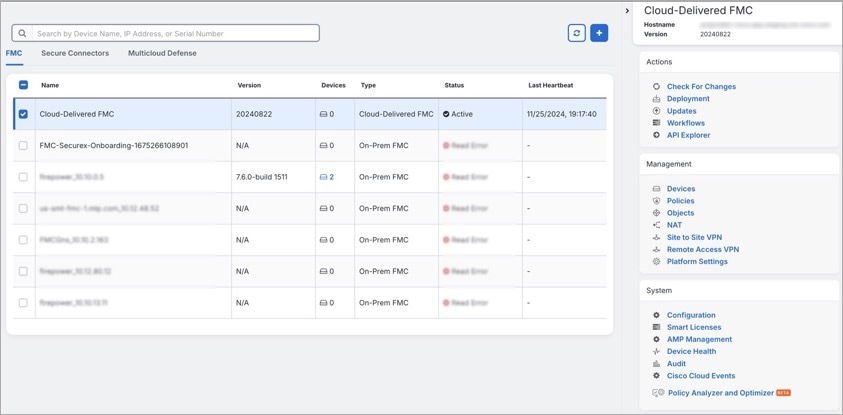
 Feedback